
Pruning
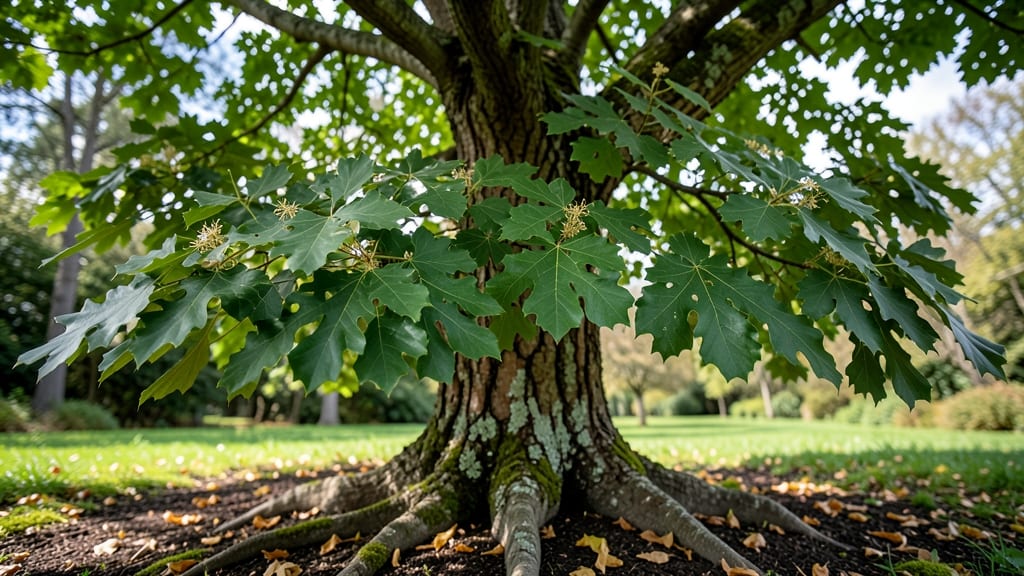
Staring at a mysterious tree in your yard or park and wondering, what tree is this Google can identify for you? 🌳 I’ve been there—standing under a towering unknown, wondering if it’s a maple, oak, or something entirely different. The good news?
You don’t need a botany degree to figure it out. Start by checking the leaves (shape, edges, veins), bark texture, and any fruit or flowers. A quick photo and a free app like Google Lens or iNaturalist can instantly name that tree for you.
Most backyard trees fall into a few common categories: oaks with lobed leaves, maples with pointed tips, or pines with needle clusters. Look for clues like leaf arrangement (alternate vs. opposite) or bark patterns (smooth vs. furrowed).
Even the way branches grow—spreading or upright—can narrow it down. I once identified a ginkgo tree by its fan-shaped leaves and that unmistakable "horseweed" smell in fall.
Once you’ve got a few details, cross-reference them with trusted resources like the USDA Plant Database or local gardening groups. You’ll quickly spot the unique traits that set trees apart—like the fuzzy undersides of birch leaves or the scaly bark of a sycamore.
Within minutes, you’ll know exactly what you’re looking at, and you’ll start noticing trees you’ve overlooked for years.
Pro tip: Snap photos in good light, including leaves, bark, and any fruit. Apps like PictureThis or LeafSnap use AI to match your images against millions of records. Before you know it, you’ll be the neighborhood tree whisperer—no green thumb required.
Common Reasons You Struggle To Identify Trees
Ever stared at a tree and thought, "What tree is this?"—only to feel lost when you search online? You’re not alone.
Whether you’re a gardener, a curious nature lover, or just someone who wants to know their backyard better, identifying trees can feel like solving a puzzle without the right clues. But why does this happen so often? Let’s break down the science—and the real-world reasons—behind the confusion.
Some trees are like chameleons—they blend in with their surroundings. If a tree lacks unique leaves, bark, or fruit, it’s easy to mistake it for another species. For example:
- Leaves: Many oaks (like red oak vs. white oak) have similar leaf shapes but differ in details like lobe edges or underside texture. Without a magnifying glass, these nuances are hard to spot.
- Bark: Young trees often have smooth bark that changes as they age. A 10-year-old maple might look nothing like a 100-year-old one.
- Seasonal Changes: Trees shed leaves, drop fruit, or even bloom at different times. A tree in winter might look completely different from its spring or summer self.
Actionable Tip: Take photos of all parts of the tree—leaves, bark, flowers, and seeds—and compare them side by side with database images. Apps like LeafSnap can help match subtle differences.
Nature loves mixing things up. Many trees are hybrids—crosses between two species—that inherit traits from both parents. This creates "in-between" trees that don’t fit neatly into identification guides. For example:
- The London planetree is a hybrid between the American sycamore and the oriental plane tree. It doesn’t match either parent perfectly.
- Some pine species (like Pinus hybrids) can have needles of varying lengths, making them harder to classify.
Why It Matters: Hybrid trees can be locally common but rare in databases. If you’re in a region with many hybrids, traditional ID methods may fail.
Actionable Tip: Check regional field guides or ask local arborists. They often know the "weird" hybrids in your area that Google might miss.
Trees adapt to their environment, leading to variations that confuse identifiers. A single species might look different in:
- Dry climates: Trees like the juniper develop thicker bark or smaller leaves to conserve water.
- Wet climates: The bald cypress grows "knees" (root protrusions) in swampy areas but looks normal in drier soil.
- Urban vs. wild: A honey locust tree in a city might be pruned aggressively, making its thorns and seed pods harder to spot.
Science Behind It: This is called phenotypic plasticity—how an organism changes its appearance in response to environmental stress. It’s why a tree in your backyard might not match the "standard" images online.
Actionable Tip: Note your tree’s location, soil type, and nearby trees. Some species thrive only in specific conditions (e.g., coast live oak vs. white oak in California vs. Texas).
Google Lens, tree ID apps, and online databases are powerful—but they’re only as good as the data you feed them. Here’s why they might fail:
- Partial Images: Uploading just a leaf (without bark or branch structure) limits accuracy. A single oak leaf could belong to dozens of species.
- Lighting and Angle: Shadows, backlighting, or odd angles can distort features. An app might misread a crumpled leaf as a different shape.
- Outdated Databases: Some tools rely on old images or don’t include newly discovered species or hybrids.
The Science: Computer vision algorithms use machine learning, which improves with more data—but they’re not perfect. A study in Frontiers in Plant Science found that even high-tech ID tools struggle with 5-10% of tree species due to these issues.
Actionable Tip: Always cross-check with at least two sources. Combine an app’s guess with a field guide or expert consultation for accuracy.
Sometimes, the problem isn’t the tree—it’s us. Common mistakes include:
- Assuming Familiarity: If you’ve only seen maple trees in parks, you might misidentify a boxelder (a close relative) as a sugar maple.
- Ignoring Growth Stage: A young willow tree looks nothing like a mature one. Its bark, leaf shape, and branches change dramatically over time.
- Overlooking Non-Leaf Clues: Smell (e.g., sassafras’s spicy leaves), leaf arrangement, or even the sound of branches (some trees creak differently) can be key identifiers.
Psychological Factor: This is called the confirmation bias—our brains latch onto the first "match" we see, even if it’s wrong. For example, if you think it’s a birch, you’ll focus only on features that fit, ignoring contradictions.
Actionable Tip: Force yourself to look for "contradictions". If an app says it’s a dogwood, but your tree has compound leaves (dogwoods have simple leaves), dig deeper.
Understanding these causes can turn your "What tree is this?" frustration into a science-based adventure. The key? Observe, compare, and verify—like a detective solving a botanical mystery. 🕵️♀️🌳
Quick Ways To Identify Any Tree
Got a mystery tree stumping you? Whether it’s a curious sapling in your backyard or an unfamiliar giant on a hike, these practical steps will help you crack the case—no botany degree required.
Below, we break down the most common scenarios and their fixes, from quick field tricks to long-term prevention for future tree ID battles.
---
Problem: You’re standing under the tree, phone in hand, but Google Lens keeps guessing wrong. Solution: Narrow it down with these 3-step field tests before hitting "search."
#### Step 1: Check the Basics Like a Pro 🌿 Start with the easiest clues—most trees reveal their identity in these details: - Leaf Shape & Arrangement: - Simple vs. compound: Are leaves single (like oak) or divided into leaflets (like hickory)? - Edge texture: Serrated (tooth-like), lobed (deep cuts like maple), or smooth? - Venation: Do veins branch out (like most trees) or run parallel (palm trees)? - Attachment: Alternate (one leaf per node, staggered) or opposite (paired at nodes)? - Bark Texture: - Smooth? (Birch, young beech) - Ridged or furrowed? (Oak, sycamore) - Peeling? (Cherry, paper birch) - Fruit/Seed Pods: - Acorns (oak), pinecones (pine), samaras (maple "helicopters"), or berries (dogwood)?
💡 Pro Tip: Snap a close-up of a leaf + bark + any fruit in natural light. Avoid shadows—Google Lens hates blurry photos!
#### Step 2: Use the "Reverse Image Search" Hack 📸 If your first guess flops, try this: 1. Take a high-res photo of the leaf/bark (fill the frame).
2. Upload to Google Lens or PlantNet (a free tree ID app). 3. Cross-check with a field guide like Audubon Society Field Guide to North American Trees.
⚠️ Common Mistake: Don’t rely only on flowers—many trees bloom seasonally, leaving you clueless the rest of the year.
#### Step 3: Note the Location & Habitat 🏞️ Trees thrive in specific zones. Ask: - Climate: Coastal (redwood), desert (juniper), or temperate (maple)? - Soil: Wetland (cypress), rocky (pine), or urban (ginkgo)? - Height & Spread: Is it a towering giant (sequoia) or a bushy shrub (serviceberry)?
--- Problem: Your search results are a mix of "elm," "maple," and "weird alien plant." Solution: Refine your approach with these diagnostic tweaks.
#### Fix 1: Rule Out the Obvious First 🚫 Before diving deep, eliminate common lookalikes: - Oak vs. Maple: Oaks have lobed leaves with bristly tips; maples have smooth edges and opposite branching. - Pine vs. Spruce: Pines have long needles in bundles; spruces have short, sharp needles attached singly. - Birch vs. Beech: Birch bark peels; beech bark is smooth and gray.
📊 Quick Cheat Sheet: | Tree Type | Leaf Clue | Bark Clue | Fruit/Seed | |----------------|------------------------|------------------------|----------------------| | Oak | Lobed, bristly edges | Ridged, scaly | Acorns | | Maple | Palmate veins | Smooth or ridged | Samaras (helicopters)| | Pine | Needles in bundles | Rough, scaly | Pinecones | | Birch | Tooth-edged, oval | Peeling white bark | Winged seeds |
#### Fix 2: Try a Tree ID App (Better Than Google) 📱 Google Lens is hit-or-miss, but these apps specialize in botany: - LeafSnap (iOS/Android): Upload a photo, get instant ID + fun facts. - PictureThis (iOS/Android): AI-powered, works offline. - iNaturalist (Community-driven): Great for rare or regional trees.
💡 Pro Tip: If the app suggests "unknown," compare your photo to the app’s examples—you might spot a detail you missed.
#### Fix 3: Ask a Local Expert 🌱 Still stuck? Leverage free resources: - Local arboretum or botanical garden: Many offer ID services. - Facebook groups like "[Your State] Plant ID"—post photos for crowdsourced help. - University extension offices: Their master gardeners are tree ID pros.
--- Problem: You keep forgetting how to tell a walnut from a butternut. Solution: Train your eye with these low-effort habits.
#### Habit 1: Start a "Tree Journal" 📖 - Take monthly photos of nearby trees (note seasons!). - Label them with species, location, and key features. - Review weekly—muscle memory builds fast.
#### Habit 2: Learn 3 New Trees a Month 🌱 Pick a theme (e.g., "Trees with Edible Nuts") and study: - Books: The Tree Book by Gina Ingoglia (beginner-friendly). - YouTube: Channels like American Forests or Epic Gardening have great ID videos. - Podcasts: The Tree Topics Podcast for deep dives.
#### Habit 3: Join a Tree-Hunting Challenge 🏆 - iNaturalist’s "City Nature Challenge" (annual event). - Local "BioBlitz" events (citizen science tree ID marathons). - Geocaching with a botany twist: Some caches require tree ID to "sign in."
--- If you’re desperate and the tree is non-native or invasive, try: 1. Scrape a tiny bark sample (like a fingernail shaving) and press it in a book for a herbarium specimen.
2. Mail it to a university herbarium (many offer free ID services). 3. Hire a local arborist for a $50–$100 consultation—they’ll solve it in 10 minutes.
💡 Remember: Even experts get stumped! Some trees (like the Eastern Redbud) have regional variations that confuse AI.
--- Final Thought: The more you observe, the easier it gets. Next time you’re out, grab a leaf, snap a pic, and guess first—you’ll be surprised how often you’re right! 🌳🔍
Frequently asked questions
What’s the quickest way to identify a tree without an app?
Start with the leaf shape and bark texture. Look for key traits like lobed leaves (oak), smooth edges (maple), or peeling bark (birch). Check if leaves are arranged alternately or opposite on branches, and note any fruit/seeds like acorns or pinecones. Compare these to a free field guide like the USDA Tree Guide.
Why does Google Lens give me wrong answers sometimes?
Google Lens works best with clear, full-frame photos showing both leaves and bark. Shadows, blurry images, or partial views (like just a leaf) confuse the AI. Try PlantNet or LeafSnap instead—they’re trained specifically for plant ID and handle edge cases better.
How do I tell the difference between a young oak and maple?
Check the leaf edges and branching. Oaks have lobed leaves with bristly tips, while maples have smooth edges and opposite branching (leaves pair directly across from each other). Young maples also develop helicopter-shaped seeds (samaras) earlier than oaks.
Can I identify a tree in winter when it has no leaves?
Focus on bark patterns, bud shapes, and branch structure. Smooth gray bark = beech; deeply furrowed = oak. Look for bud scars (horizontal lines on branches) or seed pods still clinging to branches. Apps like iNaturalist work year-round for winter ID.
What’s the weirdest tree you’ve seen that stumped even experts?
The London planetree (a sycamore-plane hybrid) is a classic trickster! Its leaves look like a mix of two species, and its bark is unlike either parent. Even arborists sometimes need to study its flower clusters or seed balls to confirm ID. Always check for hybrids in your region!